
The fastest way to cut dental no-shows is automated, multi-channel appointment reminders with two-way confirmations, backed up by human follow-up for high-risk patients. Text first, add email for detail, and reserve phone calls for the patients who never respond to either. That combination consistently produces higher confirmation rates, fewer empty chairs, and noticeably less time spent by your front desk chasing people down.
Expect these results once the system is running:
- Confirmation rates climb because patients can reply "C" from their couch instead of playing phone tag.
- No-show rates drop, and the production hours you were losing come back.
- Staff stop making reminder calls and start handling the exceptions that actually need a human voice.
Quick note on compliance: automated texts and calls fall under TCPA rules, and any message containing health details touches HIPAA. Get consent documented and vet your vendor before you send a single reminder. Templates and step-by-step setup follow below.
Key Takeaways
Automated, multi-channel dental appointment reminders with two-way confirmations reduce no-shows while human follow-up handles the patients automation alone cannot reach.
| Point | Details |
|---|---|
| Lead with SMS | Text first for confirmations, add email for detailed instructions, reserve calls for non-responders. |
| Follow a fixed cadence | Send reminders at 7 days, 72 hours, 24 hours, and same-day for the best confirmation rates. |
| Document consent | Get written opt-in for SMS and calls to stay compliant with TCPA and ADA guidance. |
| Track core KPIs | Monitor confirmation rate, no-show rate, and fill rate weekly to catch problems early. |
| Escalate high-risk patients | Route repeat no-shows and complex cases to staff instead of relying on automation alone. |
| Consider managed automation | Leadclarifyai runs reminders, confirmations, and escalation as a managed service integrated with your schedule. |
Table of Contents
- Why Automated Dental Appointment Reminders Improve Your Bottom Line
- When Should You Send Dental Recall Reminders and Confirmations?
- Ready-to-Use SMS and Email Templates for Dental Reminders
- How Do You Connect Reminders to Your Practice Management System?
- Are Automated Dental Text Reminders HIPAA and TCPA Compliant?
- What Metrics Show Your Dental Reminder System Is Working?
- Which Patients Still Need a Human Phone Call?
- What Most Practices Get Wrong About Reminder Systems
- A Managed Way to Run Dental Appointment Reminders Without the Overhead
- Frequently Asked Questions
- Sources
Why Automated Dental Appointment Reminders Improve Your Bottom Line
A missed appointment is not really about the patient forgetting. It is about your schedule, your hygienist's time, and revenue that will not come back around on its own. The American Dental Association recommends confirming visits by text, email, or phone and documenting each patient's preferred contact method, which is exactly the groundwork automated reminders need to work well.
Here is what changes once reminders run on autopilot:
- Fewer no-shows. Patients confirm or reschedule days in advance instead of just not showing up.
- Recovered production. Empty chairs get filled from a waitlist instead of sitting open.
- Staff efficiency. Front-desk time shifts from dialing numbers to handling replies that need judgment.
- Better recall compliance. Six-month cleanings stop slipping through the cracks because the system tracks them automatically.
Automation handles the volume: the routine "your appointment is tomorrow at 2 PM" texts that make up most of your reminder traffic. Where it should hand off to a person is with patients who have missed twice already, who need pre-op instructions, or who are scheduling something complex like a crown prep. The system does the repetitive work; your team handles the conversations that need a real judgment call.
When Should You Send Dental Recall Reminders and Confirmations?
Timing determines whether a reminder gets read or ignored, and channel determines whether it gets answered. Lead with SMS. It gets opened within minutes for most patients, and it is the channel younger patients actually prefer over a phone call they have to answer live. Email works better as a supporting channel for anything that needs detail: forms, insurance information, or a link to a secure patient portal. Save voice calls for confirmations that never got a reply, or for patients your system has flagged as chronic no-shows.
A cadence that works for most general dentistry practices looks like this:
- Recall reminder, 4 to 6 weeks out: a text or email nudging the patient to schedule their next cleaning or checkup.
- 7-day reminder: confirms the date and time, gives the patient a chance to reschedule with plenty of runway.
- 72-hour reminder: a second nudge for patients who have not yet confirmed, often the point where a no-reply gets escalated.
- 24-hour reminder: the highest-stakes message, since this is your last real chance to fill the slot if someone cancels.
- Same-day check-in: a short text an hour or two before the visit, mainly useful for morning appointments or patients with a history of forgetting.
Two operational details matter more than people expect. First, respect do-not-disturb hours. Sending a reminder at 7 AM or 9 PM generates complaints, not confirmations, and some state consumer-protection rules treat late-night automated texts as a violation regardless of consent. Second, if your patient base includes non-English speakers, build a language field into your intake form so reminders go out in the language the patient actually reads.
Pro Tip: Stagger your 24-hour reminders by appointment time instead of sending them all at 8 AM. A patient with a 4 PM visit who gets reminded at 8 AM has 8 hours to forget again.
Ready-to-Use SMS and Email Templates for Dental Reminders
Copy-paste templates save your team from reinventing reminder language every time someone asks "what do we send?" Personalize with tokens like {PatientFirstName}, {AppointmentDate}, {AppointmentTime}, {ProviderName}, and {OfficeName}.
SMS templates:
- 7-day confirmation: "Hi {PatientFirstName}, this is {OfficeName} confirming your visit with {ProviderName} on {AppointmentDate} at {AppointmentTime}. Reply C to confirm or R to reschedule."
- 24-hour reminder: "Reminder: your appointment is tomorrow, {AppointmentDate} at {AppointmentTime}. Reply C to confirm."
- Same-day check-in: "See you soon, {PatientFirstName}! Your appointment with {ProviderName} is today at {AppointmentTime}. Reply if you need to adjust."
- Missed appointment: "We missed you today, {PatientFirstName}. Reply or call {OfficePhone} to reschedule your visit."
- Reschedule confirmation: "Your new appointment is set for {AppointmentDate} at {AppointmentTime}. Reply C to confirm."
Email templates:
- Pre-visit instructions: covers arrival time, insurance card reminders, and any prep needed for the specific procedure.
- Consent and preference request: asks patients to confirm their preferred contact method and opt in to SMS reminders, satisfying the ADA's documentation guidance.
- Recall campaign: a friendly nudge for patients overdue for a cleaning, with a scheduling link and a note on why regular checkups matter for oral health.
For families and pediatric patients, adjust the tone and add a line addressed to the parent ("Reminder for {ChildFirstName}'s visit with {ProviderName}"). Recall and maintenance templates should reference the specific interval, six months, a year, since that context helps patients understand why they are getting a message months after their last visit.
How Do You Connect Reminders to Your Practice Management System?
Reminders only work if a patient's reply actually updates the schedule, and that requires real integration, not a separate spreadsheet someone checks once a day. There are three common paths:
- Native integration: your practice management or EHR system has a built-in reminder module that reads and writes appointment data directly, which is the cleanest option when it is available.
- API connection: a third-party reminder tool connects through an API, letting confirmations and cancellations sync automatically without double entry.
- Managed deployment: a vendor handles setup, mapping, and ongoing management for you, useful for practices without dedicated IT support.
Before going live, map every appointment type (cleaning, crown prep, emergency visit) to the right reminder sequence, since a same-day emergency slot needs a different cadence than a routine cleaning booked six weeks out. Set communication preferences at the patient level so opted-out patients never get a stray text. Then run a two-week pilot on one appointment type before rolling the system out practice-wide, testing that a reply of "C" actually marks the visit as confirmed in your schedule and that a reschedule request routes to a real person.
The most common technical pitfall is a reminder tool that sends messages but does not write confirmations back into the schedule, leaving your front desk to manually reconcile two systems; vendors like ExpressBook’s dental appointment scheduling software are built specifically to close that loop. Vendors like ExpressBook's dental scheduling platform are built specifically to close that loop.
Pro Tip: Run your pilot on your highest no-show appointment type first, usually new-patient exams, so you can measure the impact before committing practice-wide.
Are Automated Dental Text Reminders HIPAA and TCPA Compliant?
Yes, when set up correctly, but the details matter. The ADA's own guidance on appointment confirmations recommends documenting each patient's preferred contact method and getting consent for the channel you use, which is the foundation for staying compliant on both fronts.
- Get consent in writing. A checkbox on your intake form ("I agree to receive appointment reminders by text") covers your TCPA obligation for automated texts and calls.
- Keep SMS content generic. Never put diagnosis details, treatment names, or account balances in a plain text message. "Your appointment is tomorrow at 2 PM" is safe; "your root canal follow-up" is not.
- Use secure portals for anything sensitive. Link to a patient portal for forms, billing, or treatment details instead of putting them in the message body.
- Vet your vendor. Confirm the reminder platform will sign a Business Associate Agreement, since HIPAA holds your practice responsible for how vendors handle patient data too.
Skipping express consent for automated texts is one of the more expensive mistakes a practice can make. TCPA violations carry statutory penalties per message, and a bulk reminder campaign sent without documented opt-in can turn a convenience feature into a legal liability fast.
What Metrics Show Your Dental Reminder System Is Working?
Numbers tell you whether your reminder system is earning its keep or just generating noise. Track these weekly, and review them monthly with your team:
- Confirmation rate: the percentage of reminders that get a reply, texted or called back.
- No-show rate: appointments missed without cancellation, the number you are ultimately trying to shrink.
- Cancellation lead time: how far in advance patients cancel, which tells you how much time you actually have to backfill.
- Fill rate: the percentage of canceled slots that get rebooked before the appointment time arrives.
- Recovered production: dollar value of visits that would have been lost without a backfill.
| Metric | What good looks like |
|---|---|
| Confirmation rate | Rising steadily after reminders launch |
| No-show rate | Declining steadily over several weeks |
| Fill rate | Most canceled slots rebooked within a day |
For last-minute cancellations, keep an ASAP list of patients who want earlier openings and pair it with an automated backfill message that goes out the moment a slot opens. Smart scheduling practices that combine waitlists with automated fill messages close gaps faster than a front-desk staffer working the phones one call at a time.
Which Patients Still Need a Human Phone Call?
Automation is not a replacement for judgment, and the ADA is explicit that some patients need manual confirmation to reliably show up. Route these cases to a real person:
- Patients with two or more recent no-shows.
- New patients booking their first visit, who have no track record with your practice yet.
- High-value or complex procedures, implants, sedation cases, anything where an empty chair costs real money.
- Any patient who has not responded to two automated attempts.
A well-built managed system handles the bulk of confirmations automatically and only escalates these edge cases to staff, which is exactly the workflow a service like Leadclarifyai is built around: an AI Receptionist and AI Appointment Setter manage routine scheduling and reminders around the clock, while flagged patients get routed to your team with full conversation context attached.
A patient who has missed twice already does not need a friendlier text. They need someone to ask, directly, what is actually keeping them from showing up, and automation alone will not surface that answer.
What Most Practices Get Wrong About Reminder Systems
Most advice on this topic treats reminders as a messaging problem: pick a platform, load some templates, done. That undersells what is actually happening. A reminder system is a scheduling intelligence layer, and the practices getting the most out of it are the ones treating confirmation replies as data, not just a box to check off.
The overrated piece is channel selection. Everyone debates SMS versus email versus voice as if picking the "best" one solves the problem. It does not. The real lever is the escalation logic: knowing precisely which patients need a human and building that routing into the system from day one, rather than bolting it on after the no-show rate does not move.
What gets underrated is the two-way conversation itself. A reminder that only pushes information out is half a system. The value shows up when a "C" reply updates the schedule automatically and a "R" reply triggers a real rescheduling conversation without a five-minute hold. If your reminders cannot do that yet, fix that before adding more templates.
Prioritize integration before polish. A beautifully worded text that does not sync with your schedule is worse than a plain one that does.
A Managed Way to Run Dental Appointment Reminders Without the Overhead
Building all of this yourself, integration, escalation rules, compliance checks, template testing, takes real time your front desk does not have. Leadclarifyai is the alternative to piecing together separate software and staff hours for dental appointment reminders: one managed system runs your confirmations, escalations, and follow-up around the clock, without you having to babysit a dashboard.
An AI Receptionist covers inbound calls and missed-call follow-up 24/7, while an AI Appointment Setter handles confirmations, reschedules, and recall outreach across text, email, and voice. Chronic no-shows and complex cases get flagged and handed to your staff automatically, so nothing falls through simply because a patient did not reply to a text. The system connects directly to your practice management setup so a confirmation reply actually updates the schedule, and you get ongoing reporting on confirmation rates, fill rates, and recovered production instead of guessing whether it is working.
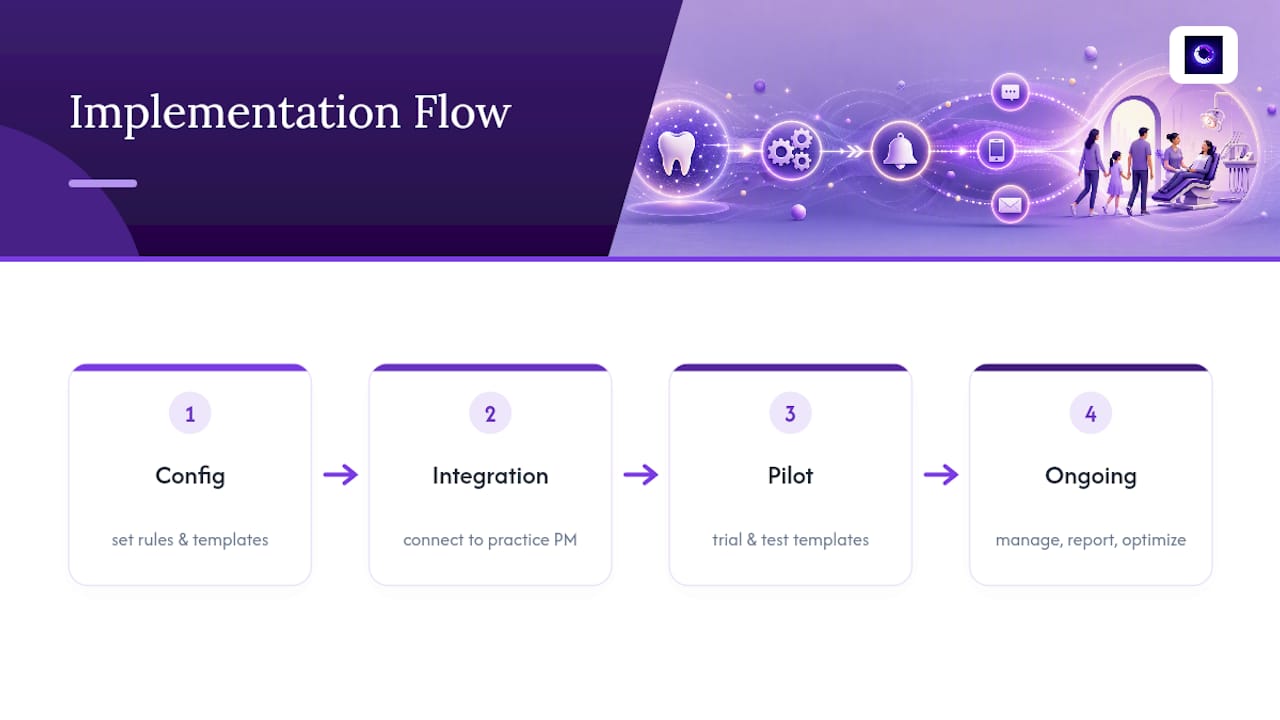
Typical setup runs through configuration, integration with your existing scheduling tools, a pilot period, and then ongoing management and optimization. If you want to see what a pilot looks like for your practice, visit the Leadclarifyai site and start the conversation.
Frequently Asked Questions
What are the best dental appointment reminders for reducing no-shows? Automated SMS reminders sent at 7 days, 72 hours, and 24 hours before the visit, paired with two-way confirmation replies, produce the strongest results. Email supplements SMS for detailed instructions, and phone calls stay reserved for patients who do not respond to either.
How do dental recall reminders differ from appointment confirmations? Recall reminders prompt patients to schedule their next cleaning or checkup, usually sent 4 to 6 weeks before a recommended interval. Appointment confirmations verify an already-booked visit and typically follow the 7-day/72-hour/24-hour cadence.
Is it legal to send automated dental appointment reminders by text? Yes, as long as the patient has given documented consent under TCPA rules and the message avoids sharing protected health information in plain text. Vetting your reminder vendor for a signed Business Associate Agreement covers the HIPAA side.
How much do dental appointment reminder systems typically cost? Pricing varies by vendor and practice size, ranging from standalone software subscriptions billed per provider or per message volume, to managed services that bundle setup, integration, and ongoing optimization into one monthly fee. Get quotes based on your patient volume rather than assuming a flat industry rate.
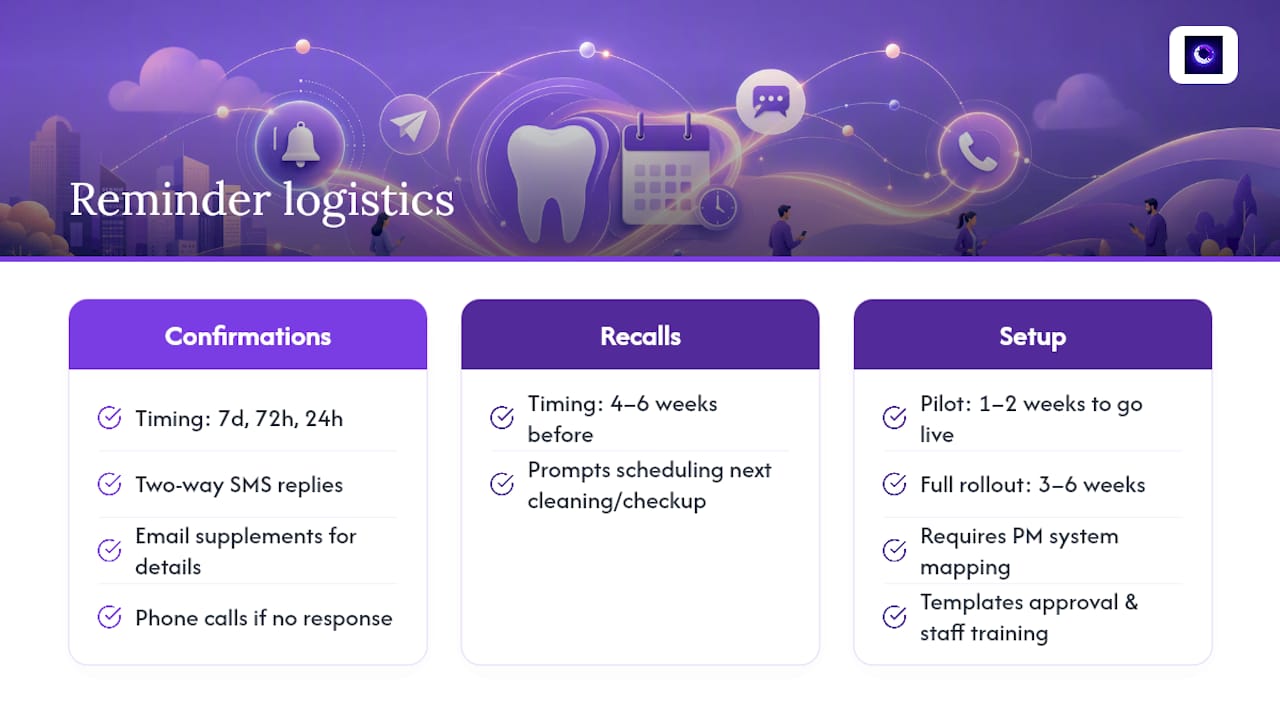
How long does it take to set up automated dental appointment reminders? A focused pilot on one appointment type can go live within one to two weeks once your practice management system is mapped and templates are approved. Full practice-wide rollout, including staff training and testing two-way replies, typically takes three to six weeks.
Sources
- Appointment Confirmations | American Dental Association
- Millennials hate phone calls — they have a point | Forbes