

For most U.S. practices, the safest bet is a managed, EHR-integrated AI receptionist backed by a signed Business Associate Agreement (BAA), rather than a bare-bones chatbot bolted onto your phone tree. That single distinction, managed and BAA-backed versus DIY and hopeful, separates the practices that pass a HIPAA audit from the ones that end up explaining a breach to the Department of Health and Human Services (HHS).
A HIPAA compliant AI receptionist is a voice or chat system that answers calls, schedules appointments, and handles patient intake while operating under the same legal and technical safeguards HIPAA demands of your human staff: encryption, audit logs, access controls, and a signed BAA that makes the vendor legally accountable for protected health information (PHI). HHS is explicit that technical safeguards alone don't satisfy HIPAA; a vendor has to sign a BAA before it ever touches patient data, full stop.
Three categories of options cover nearly every practice type. Managed integration (LeadClarify's model, and similarly built services like Emitrr) suits solo and small practices that want compliance and operations handled for them rather than assembled in-house.
EHR-native platforms (Luma Health, Klara, Hyro) fit larger groups already standardized on Epic, Athena, or Cerner who need deep two-way sync. Hybrid vendor-with-BAA setups (Sully.ai, Simbie, Retell, Smith.ai, DeepCura, OmniMD) work for practices with unusual call volume or specialty workflows that need custom configuration.
| Approach | HIPAA Posture | Integrations | Best For |
|---|---|---|---|
| Managed integration | BAA + audit logs handled by vendor | CRM, scheduling, EHR via vendor | Solo/small practices wanting turnkey ops |
| EHR-native platform | BAA required, often HITRUST-aligned | Deep Epic/Athena/Cerner sync | Multi-site groups, health systems |
| Hybrid vendor-with-BAA | BAA scope varies, verify carefully | API-level, sometimes limited | Specialty practices, high call volume |
The reasoning behind each pick comes down to risk tolerance. A two-provider dermatology practice doesn't have an IT department to audit API logs weekly, so it needs someone else managing that surface area. A 40-location cardiology group already has compliance staff who can vet a platform's HITRUST attestation line by line. According to Bureau of Labor Statistics data, the median administrative support role costs practices real money in wages and turnover, which is part of the calculation when weighing automation against adding another front-desk hire.
Key Takeaways
A HIPAA-compliant AI receptionist requires a signed BAA covering AI processing, documented EHR integration, and a managed operational model to hold up under real-world use.
| Point | Details |
|---|---|
| BAA is non-negotiable | Never engage a vendor for AI receptionist services without a signed BAA naming AI processing explicitly. |
| Match category to practice size | Managed integration suits solo/small practices; EHR-native platforms fit multi-site health systems. |
| Verify, don't assume, integrations | Confirm documented Epic, Athena, or Cerner connections during the demo, not after signing. |
| Limit AI memory scope | Keep the receptionist's data access to scheduling and demographics, not clinical detail. |
| LeadClarify offers a managed path | LeadClarify handles setup, EHR/CRM integration, and human handoff as a continuously managed service rather than self-serve software. |
Table of Contents
- What Makes an AI Receptionist Actually HIPAA Compliant?
- How Do You Choose a HIPAA-Compliant AI Receptionist?
- How Were These AI Receptionist Options Evaluated?
- Implementation Checklist: From Pilot to Full Rollout
- What Happens When a Breach Occurs Anyway?
- How LeadClarify Builds a Compliant AI Receptionist Around Your Practice
- Frequently Asked Questions
- Sources
What Makes an AI Receptionist Actually HIPAA Compliant?
A vendor can plaster "HIPAA compliant" across its homepage and still fail the one test that matters: will they sign a BAA that names AI processing explicitly? HHS guidance is unambiguous that a Business Associate Agreement is the legal mechanism that binds any vendor handling PHI to HIPAA's rules, and no amount of encryption marketing substitutes for that signature.
This section breaks down the option categories a healthcare practice actually chooses between, not head-to-head vendor rankings, but the tradeoffs baked into each product type.
Managed AI receptionist services
This category includes LeadClarify's approach and companies like Emitrr, where the vendor doesn't just license software, it installs, configures, and continuously manages the receptionist as an operational extension of your front desk. That's a meaningfully different commitment than a self-serve SaaS dashboard.
- HIPAA posture: BAA is typically standard and covers the full data pipeline, not just storage. Audit logging and encryption in transit and at rest are handled at the infrastructure level, so your staff never touches raw configuration.
- EHR/PMS integrations: Managed vendors build the connective tissue to your scheduling system and CRM, and LeadClarify specifically configures workflows around a practice's existing calendar, intake forms, and escalation rules rather than forcing a rigid template.
- Core features: 24/7 call answering, triage, appointment booking, reminders, and intake, plus human handoff for anything sensitive or ambiguous.
- Pricing model: Usually a recurring managed subscription with setup fees, priced around ongoing service rather than per-seat software licensing.
- Best for: Solo practices, small groups, and multi-location operations that want compliance and uptime handled by someone else's team, not their own.
The tradeoff is control. You're trusting a vendor's operational discipline instead of owning every configuration knob yourself. For practices without a dedicated IT or compliance staffer, that trade is usually a good one.
EHR-native and enterprise platforms
Luma Health, Klara, and Hyro sit closer to this category, platforms built to plug directly into large EHR ecosystems and handle high patient volumes across many providers.
- HIPAA posture: Enterprise platforms in this space often pursue formal attestations like SOC 2 or HITRUST, and larger vendors tend to have dedicated compliance teams maintaining documentation year-round.
- EHR/PMS integrations: This is the category's strength. Documented, tested connections to Epic, Athena, and Cerner are usually the headline feature, with bidirectional sync for scheduling and patient records.
- Core features: Patient messaging, appointment reminders, digital intake forms, and increasingly, AI-driven call handling layered on top of existing communication infrastructure.
- Pricing model: Enterprise contracts, often with per-provider or per-location pricing and multi-year terms.
- Best for: Multi-site health systems and larger groups that already have EHR standardization and IT resources to manage a bigger integration project.
The downside for smaller practices is the mismatch. Buying an enterprise platform sized for a 200-provider health system to run a three-doctor family practice tends to waste both budget and implementation time on features you'll never use.
Specialty and hybrid AI voice vendors
Sully.ai, Simbie, Retell, Smith.ai, DeepCura, and OmniMD represent a broader, faster-moving category: AI voice and virtual assistant vendors that range from general-purpose call handling to healthcare-specific configurations.
- HIPAA posture: This is where diligence matters most. Some vendors in this space sign BAAs readily; others treat HIPAA compliance as an add-on tier or don't address it clearly on their pricing pages at all. Always confirm the BAA explicitly covers AI processing, not just data storage.
- EHR/PMS integrations: Varies widely by vendor. Some offer API-level connections to major EHRs; others rely on manual data entry or lighter integrations that create workflow gaps.
- Core features: Voice-based call triage, appointment scheduling, and in some cases outbound reminder calls or follow-up sequences.
- Pricing model: Often usage-based or tiered by call volume, which can make cost forecasting harder for practices with unpredictable patient traffic.
- Best for: Practices with specific workflow needs, unusual call patterns, or a preference for assembling their own tech stack rather than a single managed vendor.
Pro Tip: During any demo, ask the vendor to show you, on screen, exactly where a patient's phone number and reason for calling get stored the moment the call ends. If they can't answer in under a minute, that's your answer about how mature their compliance architecture really is.
Virtual medical assistant models add another wrinkle. Remote staffing models that use HIPAA-trained personnel alongside AI tools typically require pre-execution of BAAs and dedicated access controls before anyone, human or AI, can touch your EHR remotely. That's a useful benchmark: if a pure-AI vendor offers looser access controls than a virtual staffing agency, something's wrong.
HHS compliance guidance makes clear that agreements govern not just whether PHI can be shared, but what happens procedurally when something goes wrong, including how investigations and documentation unfold after an incident.
What separates a real trust signal from marketing copy
Plenty of healthcare messaging vendors lean on the same vocabulary: end-to-end encryption, archived communications, administrative controls. Some clinical communication platforms document these features prominently, and secure texting products commonly recommend sanitizing push notifications so PHI never displays on a staff member's lock screen. That's a smart, low-cost habit worth adopting regardless of which vendor you choose.
The stronger signal is a documented attestation. A handful of clinical collaboration platforms reference HITRUST or SOC 2 certifications alongside audit log capabilities and role-based permissions, and that combination, third-party attestation plus visible audit trails, is what separates a compliance program from a compliance claim. Some platforms go further and treat HIPAA compliance as an architectural decision baked into the product from the ground up rather than a feature you toggle on later. That's the posture you want from any AI receptionist vendor, managed or otherwise.
Feature checklists matter too, but only after compliance clears the bar. Vendor pages across the messaging space commonly promote dedicated phone numbers, archived communications, and granular admin controls as baseline capabilities. Treat those as table stakes, not differentiators, when you're comparing finalists.
How Do You Choose a HIPAA-Compliant AI Receptionist?
Run every finalist through the same checklist before you sign anything. Skipping steps here is exactly how practices end up with a vendor that looks compliant on a sales call and fails an actual audit six months later.
- Confirm BAA availability first, before discussing features. If a sales rep hesitates or says "we'll figure that out during onboarding," that's a disqualifier, not a negotiation point.
- Verify encryption in transit and at rest. Ask specifically whether PHI is encrypted at every hop, not just "on our servers."
- Request documentation of audit logging. You need to know who accessed what data and when, and that log needs to be exportable for your own compliance review.
- Check role-based access controls. Front-desk staff, providers, and vendor support staff should have different access tiers, not a shared login.
- Ask how the system handles de-identification and data minimization. A receptionist AI generally doesn't need to know a diagnosis to book an appointment.
- Map every EHR/PMS integration point. Confirm which systems connect natively (Epic, Athena, Cerner, NextGen) versus which require manual workarounds.
- Get the incident response process in writing. Ask what happens, procedurally, in the first 24 hours after a suspected breach.
During the actual demo, ask these questions out loud and watch how confidently the team answers:
- "Does your BAA explicitly name AI processing, or does it only cover general data storage?"
- "Where is PHI physically processed, on your servers, a subprocessor's, or a third-party LLM API?"
- "Which large language models or APIs power this system, and are those providers covered under your BAA?"
- "What's your data retention policy for call transcripts and intake forms?"
- "Can I export an audit log showing every access event tied to a specific patient record?"
- "What's your documented breach notification timeline?"
Watch for these red flags, any one of them should end the conversation:
- No BAA offered, or a BAA that doesn't mention AI or LLM processing specifically.
- Patient conversations routed through consumer-grade LLM tools without a BAA covering that specific API.
- No audit log access for your compliance team.
- Integration described only in marketing language, with no documented API or connector for your specific EHR.
- No written SLA for when and how a call escalates to a live human.
Pro Tip: Build a simple scoring sheet before your first demo, five columns, one for each finalist, rows for BAA clarity, integration depth, feature completeness, pricing transparency, and support SLA. Score 1 to 5 during the call itself. Memory fades fast after four vendor demos in one week, and a live scorecard keeps your comparisons honest.
How Were These AI Receptionist Options Evaluated?
The category breakdowns above weigh six factors: HIPAA posture (documented BAA terms, audit logging, encryption), integration maturity (verified EHR/PMS connections versus claimed ones), feature completeness (call handling, scheduling, intake, reminders), voice and conversational quality, pricing transparency, and support responsiveness including SLA terms for human handoff. HIPAA posture and integration maturity carry the most weight, because a feature-rich system that fails either one isn't a viable option for a covered entity.
Trust signals that pushed a category higher in this guide included a clearly signed BAA covering AI processing specifically, third-party attestations like SOC 2 or HITRUST where publicly documented, verifiable EHR integrations rather than marketing claims, and visible audit log and role-based access capabilities.
This guide has real limits worth stating plainly. Vendor documentation on public websites doesn't always disclose full BAA terms, and marketing pages routinely overstate integration depth compared to what actually ships. Specialty workflows, behavioral health intake, dental scheduling, multi-provider dermatology, vary enough that a category that fits a primary care practice may not fit a specialty group with unusual documentation needs. Where possible, evaluation leaned on how each category handles voice interactions and human handoff for sensitive conversations, since that behavior matters more in practice than any spec sheet.
Implementation Checklist: From Pilot to Full Rollout
Deployment timelines vary by practice size, but the sequence stays consistent. Skipping steps to move faster is the single most common cause of compliance gaps during rollout.
- Select finalists and execute the BAA before any test data touches the system. No exceptions, even for a "sandbox" trial.
- Plan EHR integration mapping. Identify exactly which fields sync (appointment slots, patient demographics, intake responses) and which stay manual.
- Run a test data phase with synthetic or de-identified records. Confirm the AI handles edge cases, wrong numbers, urgent symptoms, insurance questions, without exposing real PHI.
- Train front-desk staff on escalation triggers. They need to know exactly when and how a call routes to a human.
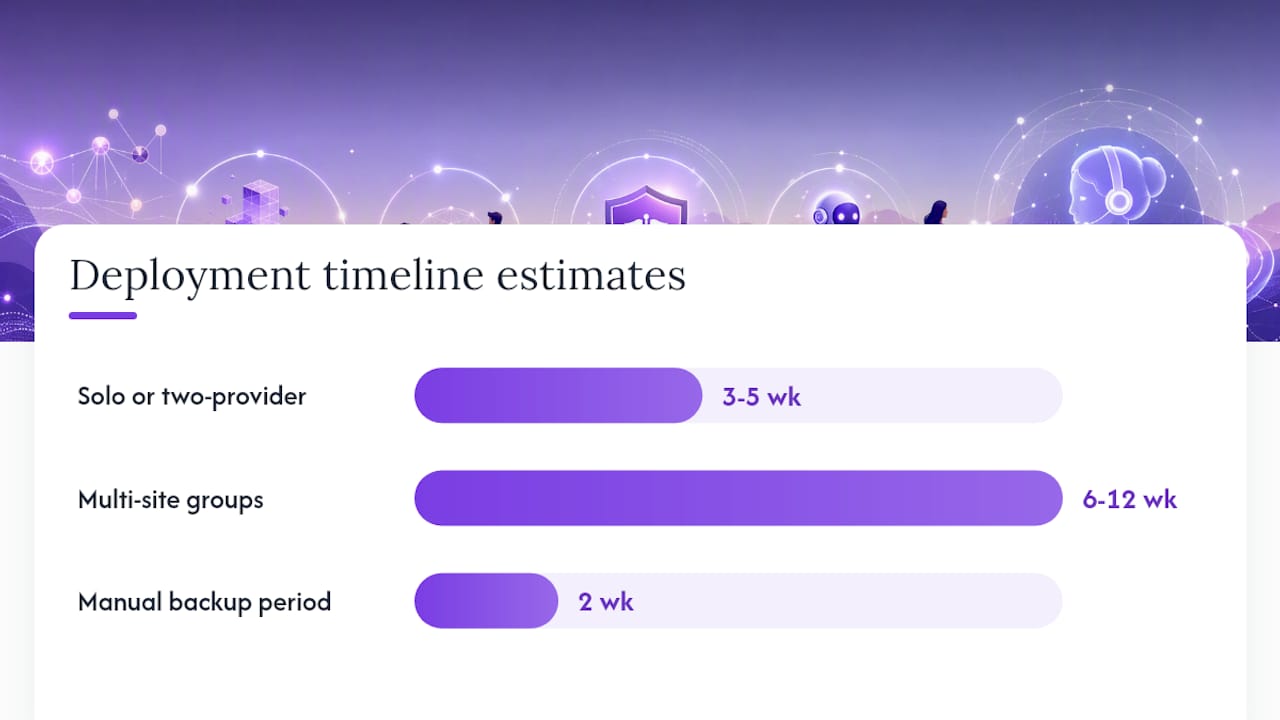
- Set a go-live cutover date with a fallback plan. Keep a manual backup process ready for the first two weeks.
Timeline estimates vary by scale. A solo or two-provider practice can typically move from vendor selection to go-live in three to five weeks, mostly limited by BAA execution and calendar/scheduling sync testing. Multi-site groups connecting to Epic or Cerner should expect six to twelve weeks, driven by integration testing across each location's specific workflow variations.
Four roles need clear ownership: a clinical lead who signs off on workflow logic (what the AI can and can't discuss), an IT or security lead who verifies encryption and access controls, a compliance officer who reviews the BAA and audit logging setup, and a front-desk champion who becomes the staff point of contact for day-to-day issues. Vendor success managers should be looped in from week one, not brought in only after something breaks.
Pilot success gets measured against concrete acceptance criteria: audit logs enabled and exportable from day one, a measurable drop in missed calls compared to your baseline, scheduling accuracy matching manual booking rates, and zero instances of PHI routed outside the documented, BAA-covered data flow.
Pro Tip: Sanitize push notifications on any staff device connected to the system so patient names or reasons for calling never display on a locked phone screen, a small habit that closes a surprisingly common exposure gap. Ongoing training matters as much as initial setup. Shadow IT, staff quietly using a consumer chatbot or personal texting app because it's faster than the official system, is one of the more common breach sources HHS materials flag, and the fix is recurring training, not a one-time onboarding memo.
What Happens When a Breach Occurs Anyway?
Even a well-configured AI receptionist can be part of an incident, whether through a misconfigured integration, a vendor-side vulnerability, or human error during handoff. What matters most is what happens in the following hours and weeks.
HHS compliance materials describe agreements as governing not just data-sharing terms but the procedural expectations after something goes wrong, including how investigations proceed and what documentation regulators expect to see. Your contract with any AI receptionist vendor should specify a breach notification timeline in writing, commonly a set number of days from discovery, not from when the vendor decides to tell you.
Documentation matters as much as speed. Practices should maintain a written incident log covering when the breach was discovered, what data was involved, how many patients were affected, and what containment steps were taken immediately. Your vendor's audit logs become critical evidence here. If the system can't produce a clear record of who accessed what and when, reconstructing the scope of a breach turns into guesswork.
Staff training should include a plain-language explanation of what to do the moment they suspect an issue, who to notify internally, and not to attempt containment on their own. The gap between a minor documented incident and a reportable breach often comes down to how quickly and clearly the first 24 hours are handled.
What I've learned about where these systems actually earn their keep
The AI receptionist that works isn't the one with the most features. It's the one your staff treats as a coworker with clear boundaries, not a black box they route everything through. The practices that get this right keep the AI's memory narrow: scheduling, demographics, basic triage, and nothing resembling clinical detail.
The real tradeoff isn't automation versus humans. It's deciding, upfront, which conversations stay AI-handled and which trigger an immediate live-agent fallback. A patient asking to reschedule is fine for AI. A patient describing chest pain needs a human in seconds, not a queue. Practices that skip this design step, the ones treating every call the same, are the ones who end up with awkward stories about the bot mishandling something sensitive.
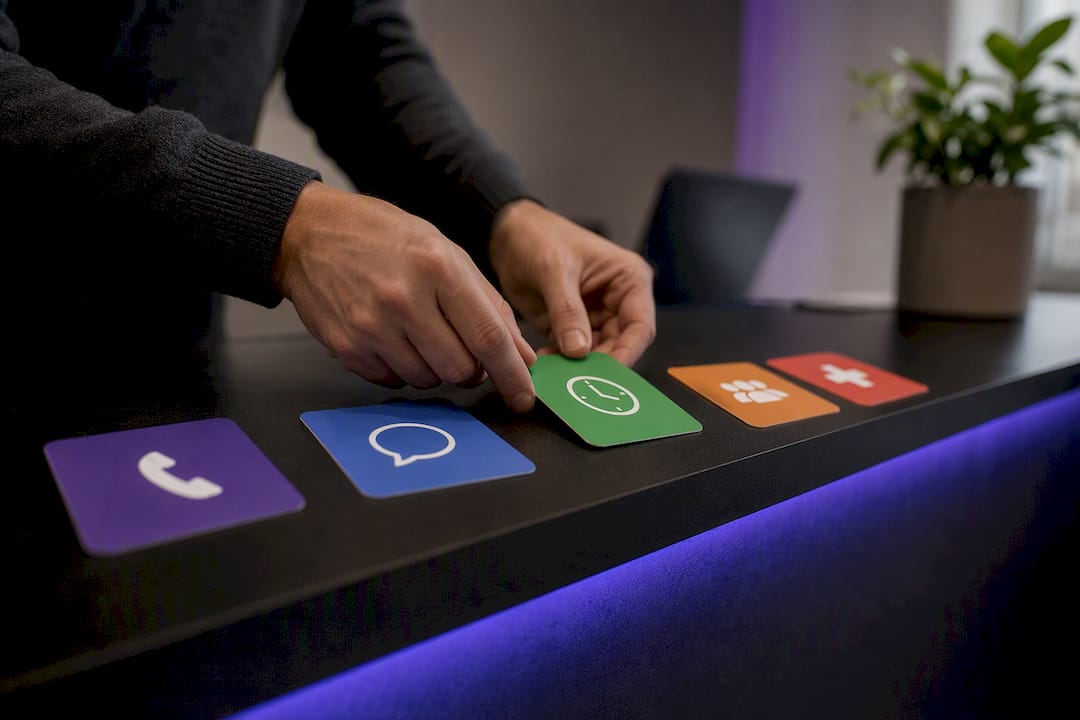
Data minimization sounds like a compliance checkbox until you realize it also makes the AI better at its job. Limiting scope to scheduling and intake, rather than trying to capture everything, keeps both risk and complexity contained.
How LeadClarify Builds a Compliant AI Receptionist Around Your Practice
If the categories above left you weighing a managed option, LeadClarify is built specifically for practices that want the compliance groundwork and day-to-day operation handled by someone else's team, not assembled from a stack of disconnected tools.
LeadClarify configures its AI Receptionist around your practice's actual call volume, scheduling rules, and escalation needs rather than a one-size template, with human handoff built into the workflow for any conversation that needs a live staff member. The system connects to your existing calendar and CRM, logs every interaction, and keeps operating continuously rather than requiring your team to manage updates, monitoring, or troubleshooting on top of everything else on their plate. That's the core advantage of a managed model over a self-service platform: someone is actively watching the system, not just licensing it to you and walking away.
Before booking a demo, have three things ready: your current EHR or scheduling system, a rough estimate of monthly call volume, and the name of whoever handles compliance sign-off at your practice. Request a pilot with LeadClarify to see how the setup maps to your specific front-desk workflow before committing to a full rollout.
Frequently Asked Questions
Can an AI receptionist be HIPAA compliant? Yes, but only when the vendor signs a BAA that explicitly covers AI and LLM processing, implements encryption in transit and at rest, and maintains exportable audit logs. Compliance isn't a feature; it's a contractual and technical combination that has to be verified, not assumed from marketing copy.
What's the difference between a HIPAA-compliant virtual assistant and an AI receptionist? A virtual assistant typically refers to a human or hybrid remote staffing model handling administrative tasks under HIPAA-trained protocols, while an AI receptionist is software that answers calls and schedules appointments autonomously. Both require a BAA, but the AI version needs additional scrutiny around which language models or APIs process patient conversations.
Do all AI receptionist vendors offer a Business Associate Agreement? No. Some vendors treat HIPAA compliance as a premium tier or don't address it clearly at all. Always ask directly during the sales process, before discussing pricing or features, whether a BAA is standard and whether it names AI processing specifically.
How long does it take to implement a HIPAA-compliant AI receptionist? Solo and small practices typically go live within a matter of weeks. Multi-site groups integrating with Epic, Athena, or Cerner should plan for longer timelines depending on integration testing complexity across locations.
What should practices ask about hipaa compliant messaging features specifically? Ask whether message content gets sanitized in push notifications, whether archived communications are searchable and exportable for audits, and whether the system uses dedicated business phone numbers rather than staff personal devices.
Is a cheaper AI receptionist ever a better choice for a small practice? Only if it still meets every compliance requirement. A lower price point that skips BAA coverage, audit logging, or documented EHR integration isn't cheaper, it's a liability that costs far more if an incident occurs.
This article is general information, not a substitute for advice from a qualified lawyer. Consult a qualified legal professional about your own circumstances before acting on anything here.